
Community Resources
Current News
(Updated 7/13/2026)El Paso Mesh users met on Saturday July 11th and reviewed the Meshmapper application and how to use the Wardriving functionality.There were alot of Items discussed but one of the key items is the need to make sure that all repeater owners update the firmware on their repeaters to a minimum of version 1.14 and enable the 2 Byte Hash. This is needed because of the explosive growth of our network to prevent conflicts with new repeaters as they come online. For more information on how to enable the 2 Byte hash, please review this document.
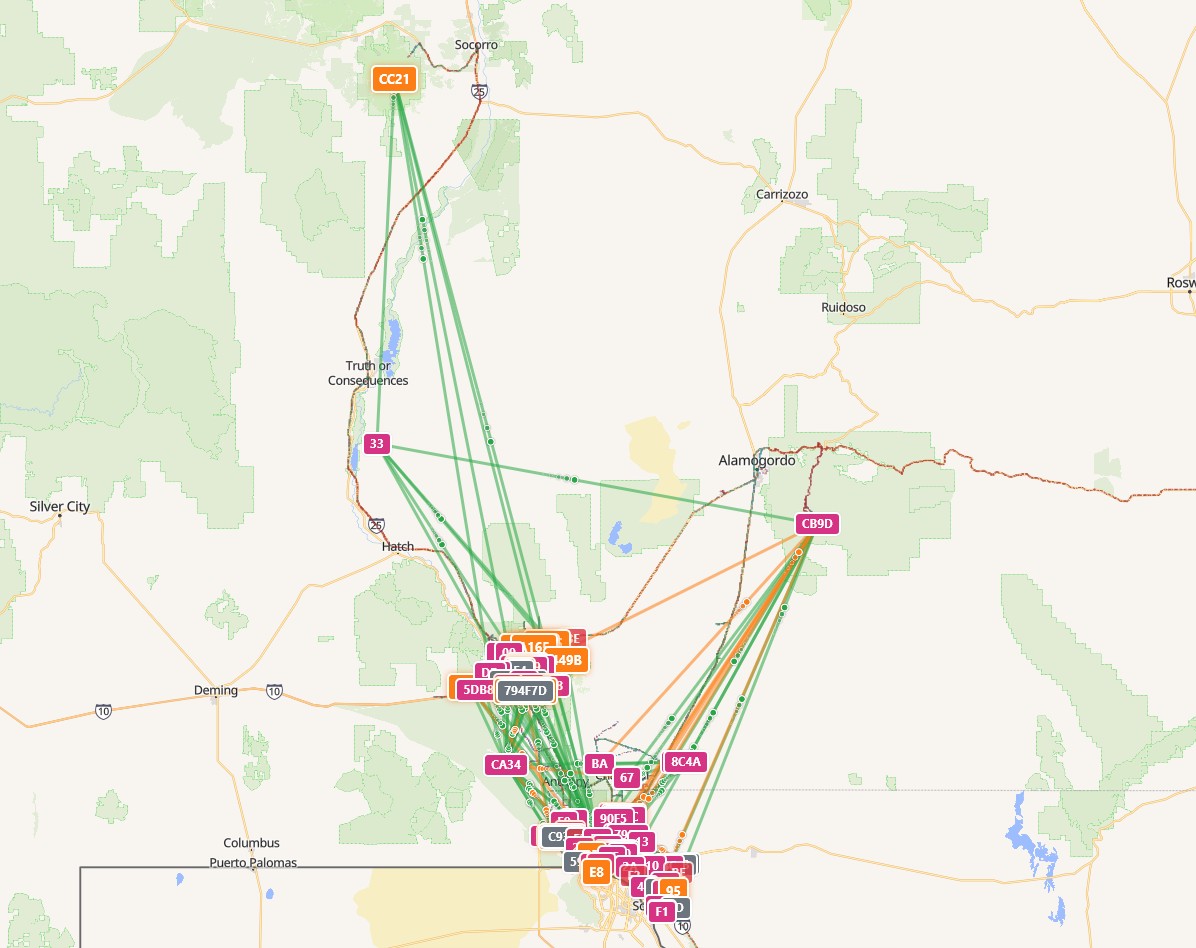
You may have noted the recent significant increase in traffic. Right after Saturdays meeting, a new repeater was deployed near Socorro NM. That repeater has enable the connection of El Paso's Mesh network to the nodes in Northern NM (Albuquerque Mesh). The ABQ folks have over 100 nodes deployed reaching up beyond Santa Fe and into Los Alamos. This has significantly expanded the coverage of our network and will necessitate some changes that we will need to make to avoid confusion in the future.
For folks who are just starting out, we have added a list of channels that currently are supported on our Mesh (in addition to the Public channel). Look in the Documentation Section below for the latest channel listing.
Also, we have now added a link to the official "Meshcore Quickstart Guide" for those who do not like to read the conmprehensive documentation. You will find it in the Help section below.
Local Meetups
Join us for our monthly Elpmesh network meetings where we help with setup, troubleshooting, and network expansion planning. Locations, dates and times are posted on our Discord server and change from month to month. (Link below)
- August Meet-up: To be announced
- Location: To be announced
- Special Event: To be announced ElpMesh Discord
Online Documentation
Need Help?
Contact us on our Discord Server (Link above), attend our next community meetup or reach out on the public channel of the Meshcore network. Experienced members are always happy to help answer any questions you may have!
Official Meshcore Quickstart Guide
What is Mesh Networking?
Our Elpmesh community network uses Meshcore to create a decentralized, off-grid communication system. This means we can send messages without cell towers, internet, or any centralized infrastructure—perfect for emergencies, outdoor activities, and building community resilience.
⚙️ Meshcore
Enhanced mesh networking capabilities that extend range and functionality, creating a robust community communication network.
🔋 Off-Grid Ready
Battery-powered devices that work when everything else fails. Solar charging options keep you connected indefinitely.
Why Join Our Mesh Network?
- Emergency Communications: Stay connected during power outages, natural disasters, or network failures
- Privacy-Focused: Encrypted messages, no corporate surveillance, no data collection
- Community Building: Connect with neighbors and strengthen local relationships
- Free Forever: No monthly fees, no subscriptions, just one-time hardware costs
- Expandable Range: Each device extends the network, creating better coverage
- Fun & Educational: Learn about radio technology and networking
Getting Started
Step 1: Get Hardware
You'll need a Meshcore compatible device. Most are available from Amazon and popular options include:
- LILYGO T-Beam: Popular choice with GPS, battery management (~$40-60)
- Heltec LoRa: Affordable option with OLED display (~$25-35)
- RAK WisBlock: Modular system for advanced users (~$50-80)
Step 2: Install Software
Download the Meshcore app for your phone or tablet:
- iOS: Available on the Apple App Store
- Android: Available on Google Play or F-Droid
Step 3: Configure Your Device
Basic configuration steps:
- Flash the latest firmware on to your device
- Connect to your node via Bluetooth using the mobile app
- Comnplete the required configuration steps (see the Meshcore site for specifics)
- Join our community Discord server to get additional help.
Step 4: Join the Network
Once configured, your device automatically connects to nearby Meshcore Repeaters.
Best Practices
📍 Placement Matters
Place fixed nodes high up with clear line of sight. Rooftops, attics, and upper floors work best.
🔋 Power Management
For portable nodes, use power-saving modes. Fixed nodes can run continuously with solar panels.
🤝 Be a Good Neighbor
Keep messages brief and relevant. This is a shared resource—use it thoughtfully, but use it.
Ready to Get Connected?
Join our growing community of mesh network enthusiasts. Together, we're building resilient, independent communication infrastructure.
Learn More About Meshcore Learn More About Meshtastic